Light Properties
The point, spot, directional, rect, disk and cylinder light components share one base class (plLightComponent), so they have the same colour, shading and shadow properties. This page describes those once. Each light's own page lists only what is specific to it.
The ambient light, fill light and sky light are not based on plLightComponent and do not have these properties.
The inspector sorts a light's properties into groups, in this order: Color, Intensity, Shape, Shading, Shadows and, for spot and rect lights, Cookie. Properties that have no effect with the current settings are hidden, for example Temperature while UseColorTemperature is off, or the bias settings while CastShadows is off.
The light header
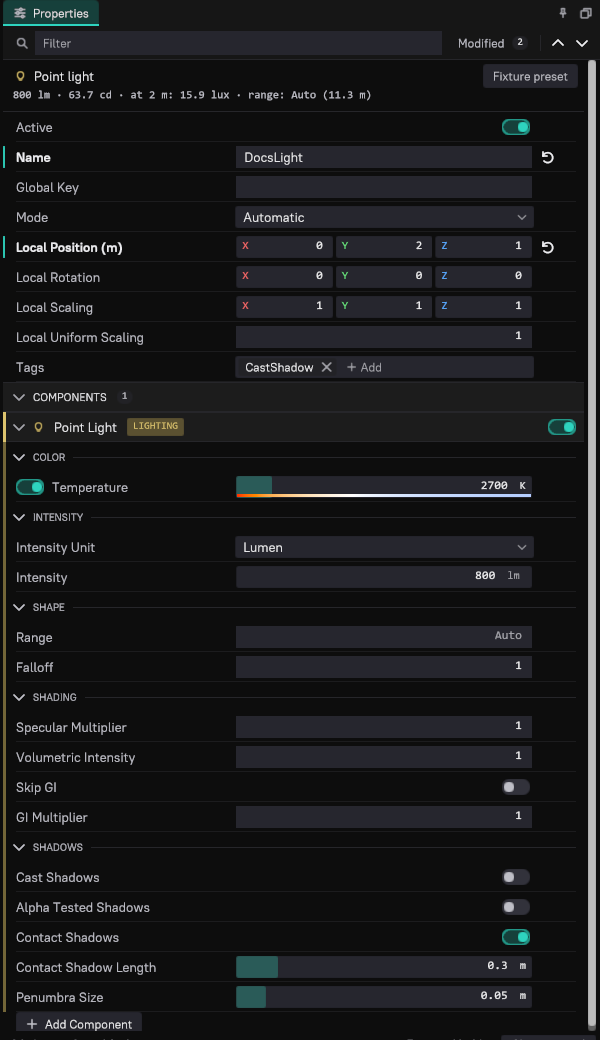
When a single light is selected, either its game object or the component itself, a header above its properties shows:
- The light type and a Fixture preset button (point, spot, rect, disk and cylinder lights; not in read-only documents).
- A photometric readout that follows every change, including undo and redo. For a point light with 20,000 lm it reads
20,000 lm · 1,592 cd · at 2 m: 398 lux · range: Auto (56.4 m):- the output in lumens and in the light's canonical unit: candela for point and spot lights (a spot light shows its beam candela), nits for area lights, lux for a directional light,
- for point and spot lights, the illuminance on a surface 2 m away,
- the range: with
Rangeon Auto, the distance it works out to; with an explicitRange, the illuminance still left at the range edge (range edge: 8.1 lux).
- One-sentence warnings for implausible settings:
| Warning | When |
|---|---|
| The light is visibly cut off at its range | An explicit Range where the light still gives more than 1 lux. Set Range to Auto or extend it. |
| Over 200,000 lm is brighter than any real lamp | Point and spot lights. Check the unit and the value. |
| Over 10 million nits is brighter than any real lamp surface | Rect, disk and cylinder lights. |
| Under 1,000 lux this reads as a legacy value or a very dim sun | Directional lights between 1 and 1,000 lux. |
| This is brighter than the sun above the atmosphere | Directional lights above 150,000 lux. |
| Falloff is not 1, so the light is not physical | Falloff differs from 1; the readout no longer applies. |

Fixture presets
A fixture preset sets a real lamp's lumens, colour temperature and shape. Pick one in either place:
- Fixture preset in the light header, for the selected light.
- Scene > Lighting > Light from Preset, grouped by light type. The preset goes onto every selected light of its type. With no such light selected, it creates a new light, named after the preset, 3 m in front of the camera of the viewport the mouse was over last.
Applying a preset is one undo step. It sets IntensityUnit to lumen, Intensity, UseColorTemperature on and Temperature, plus the shape: the cone angles of a spot light (with Reflector on), Width and Height of a rect light, Radius of a disk light, Radius and Length of a cylinder light.
The engine ships these presets (Data/Base/Lighting/LightPresets.ddl):
| Preset | Type | Lumens | Kelvin | Shape |
|---|---|---|---|---|
| Candle | Point | 12 | 1850 | |
| 40 W incandescent | Point | 450 | 2700 | |
| 60 W incandescent, 9 W LED | Point | 800 | 2700 | |
| 100 W incandescent | Point | 1600 | 2850 | |
| Halogen spot, 50 W, 36 degrees | Spot | 900 | 3000 | 36° outer, 18° inner |
| Fluorescent tube, 1.2 m | Cylinder | 3350 | 4000 | radius 0.013 m, length 1.2 m |
| LED panel, 600 x 600 | Rect | 3600 | 4000 | 0.6 × 0.6 m |
| Torch | Spot | 300 | 6000 | 20° outer, 10° inner |
| Car headlight, halogen low beam | Spot | 1500 | 3200 | 40° outer, 20° inner |
| LED street light | Spot | 12,000 | 4000 | 120° outer, 80° inner |
| Sodium street light, 250 W | Point | 28,000 | 2100 | |
| Stadium floodlight | Spot | 150,000 | 5600 | 40° outer, 20° inner |
To add your own, put a Lighting/LightPresets.ddl into your project's data directory. It is read after the engine's file: an entry with the same Name replaces the engine's, other entries are added. The file is read each time the menu opens, so edits show without a restart. Each entry looks like this:
Preset { string %Name{"Desk lamp"} string %Type{"Spot"} float %Lumens{450} float %Kelvin{3000} float %OuterAngle{60} float %InnerAngle{40} }
Type is Point, Spot, Rect, Disk or Cylinder. Shape fields: OuterAngle and InnerAngle (full cone angles in degrees) for spots, Width and Height for rects, Radius for disks, Radius and Length for cylinders, all in metres.
Color
| Property | Default | Description |
|---|---|---|
UseColorTemperature | On | Takes the colour from Temperature. Off uses LightColor. |
Temperature | per light type | Blackbody colour temperature in kelvin, white-balanced so that 6500 K is white. Lower is warmer (orange), higher is cooler (blue). The slider covers 1000 to 15,000 K; values below 1500 K are raised to 1500 K. |
LightColor | white | RGB colour, used while UseColorTemperature is off. |
The colour only sets the hue. It is normalised to a luminance of 1, so a dark or saturated colour does not make the light dimmer: Intensity alone sets the amount of light. A black colour switches the light off.
The default temperature depends on the light type: 2700 K for point lights (a household bulb), 3000 K for spot and disk lights, 4000 K for rect and cylinder lights, 5700 K for the directional light (the sun at noon).
To match the camera to the lights, set the camera's WhiteBalanceKelvin to the lamps' temperature (see Physical Light Units).
Intensity
| Property | Description |
|---|---|
IntensityUnit | The unit Intensity is in. Point and spot lights: Lumen or Candela. Rect, disk and cylinder lights: Lumen or Nits. The directional light is always in lux and has no unit choice. The Intensity label shows the unit, for example Intensity (lm). |
Intensity | The amount of light in that unit. |
Changing IntensityUnit in the editor converts Intensity so that the light stays equally bright. Lights created in the editor use lumens; lights created from code default to candela (point, spot) and nits (area lights), which are the units the renderer works in.
See Physical Light Units for what the units mean, the default intensity of each light type, and typical real-world values.
Range and falloff
Point, spot, rect, disk and cylinder lights end at a range:
| Property | Default | Description |
|---|---|---|
Range | Auto | Distance at which the light ends, in metres. Auto (0) computes it from the intensity: the light ends where its illuminance falls below Rendering.Lighting.CutoffIlluminance (0.5 lux). An explicit range ends the light earlier or later, with a smooth fade at the edge. |
Falloff | 1 | Exponent on the inverse-square distance falloff. 1 is physically correct. Values below 1 carry the light further, above 1 make it die off faster. Rect lights ignore it in rasterised lighting (see Rect Light Component). |
With Auto, a light's reach grows with the square root of its brightness: an 800 lm bulb reaches about 11 m, a 20,000 lm lamp about 56 m. A larger range costs performance, because the light then overlaps more of the screen. For area lights the automatic range uses the luminance times the largest projected area of the emitter, so it is measured as for a point light from the light's centre.
A selected light shows its range in the viewport. Rect and disk lights show a half sphere in front of the surface (a full sphere when TwoSided is on); with Auto range they show where the light falls below the cutoff, which narrows to the sides because a flat emitter dims with the angle from its normal. Cylinder lights show a sphere.
Shading
| Property | Default | Description |
|---|---|---|
SpecularMultiplier | 1 | Scales the light's specular highlights and reflections. 0 gives diffuse light only. Values other than 1 are not physical. |
VolumetricIntensity | 1 | Scales how much the light shows in volumetric fog. 0 keeps the light out of the fog. |
SkipGI | Off | Leaves the light out of indirect lighting (global illumination). Its direct light is unchanged. |
GIMultiplier | 1 | Scales the light's contribution to indirect lighting only, not its direct light or volumetrics. |
Shadows
| Property | Default | Description |
|---|---|---|
CastShadows | Off | The light casts dynamic shadows. Costs performance for every shadowed light. |
TransparentShadows | Off | Transparent objects cast shadows, emulated with dithering. Also keeps the light's shadow map when ray-traced direct lighting already shadows the opaque surfaces (see Dynamic Shadows). Shown while CastShadows is on. |
AlphaTestedShadows | Off | Ray-traced shadow rays of this light see through the cut-out parts of masked materials, such as foliage. Off, a masked surface shadows as a solid triangle. Costs extra per ray. Rendering.ReSTIRDI.AlphaTestedShadows forces it on for every light. Has no effect on shadow maps. |
ContactShadows | On | Adds a short screen-space shadow towards the light. Works with or without CastShadows. See Contact Shadows. |
ContactShadowLength | 0.3 m | Length of the contact shadow trace, 0.02 to 2 m. Shown while ContactShadows is on. |
PenumbraSize | 0.05 m | Size of the light source, 0 to 0.5 m. Larger values soften shadow edges and contact shadows. Ray-traced lighting uses it as the emitter radius of point and spot lights. Shown while CastShadows or ContactShadows is on. |
SlopeBias | 0.25 | Offsets the shadow-map comparison by the surface slope, 0 to 10. Raise it against shadow acne on steep surfaces. |
ConstantBias | 0.1 | Offsets the shadow-map comparison by a fixed amount, 0 to 10. Raise it against acne on flat surfaces; too much detaches shadows from their casters (peter-panning). |
SlopeBias and ConstantBias only apply to shadow maps; they are shown while CastShadows is on. With virtual shadow maps (the default for the directional light) the sun uses the bias console variables instead. See Dynamic Shadows for shadow quality, techniques and the per-light shadow settings of point, spot and directional lights.
Changing light colour at runtime
Every light accepts the set color message (plMsgSetColor), which changes LightColor. Property animations and scripts can use it to tint or flicker a light; it has no visible effect while UseColorTemperature is on.
Console variables
| CVar | Default | Description |
|---|---|---|
Rendering.Lighting.CutoffIlluminance | 0.5 | Illuminance in lux at which a light with Range Auto ends. Lower values reach further and cost more. Saved with the project. |
Rendering.Lighting.VisScreenSpaceSize | false | Debug: draws each light's bounding sphere with its screen-space size, and its shadow screen size and fade-out when it casts shadows. Development builds only. |
Rendering.Lighting.VisClusterData | false | Debug: visualises how many lights fall into each screen cluster. |
Rendering.Lighting.VisClusterDepthSlice | -1 | Shows the cluster visualisation for only one depth slice. -1 shows all. |
Existing scenes
Scenes saved before 0.12 load with the same brightness: point and spot lights load in Candela, area lights in Nits, and the luminance of the old colour is folded into Intensity (old colours were not normalised). Lights that were saved with Range 0 were switched off and load with Intensity 0, because Range 0 now means Auto. Lights saved before contact shadows existed load with ContactShadows off.