Rect Light Component
The rect light component (plRectLightComponent) adds a light that emits from a flat rectangle, such as a window, a softbox, a ceiling panel or a screen. Its specular highlights take the shape of the rectangle and its shadows soften with distance, which makes it look more natural than a spot light. It is more expensive than a point or spot light.
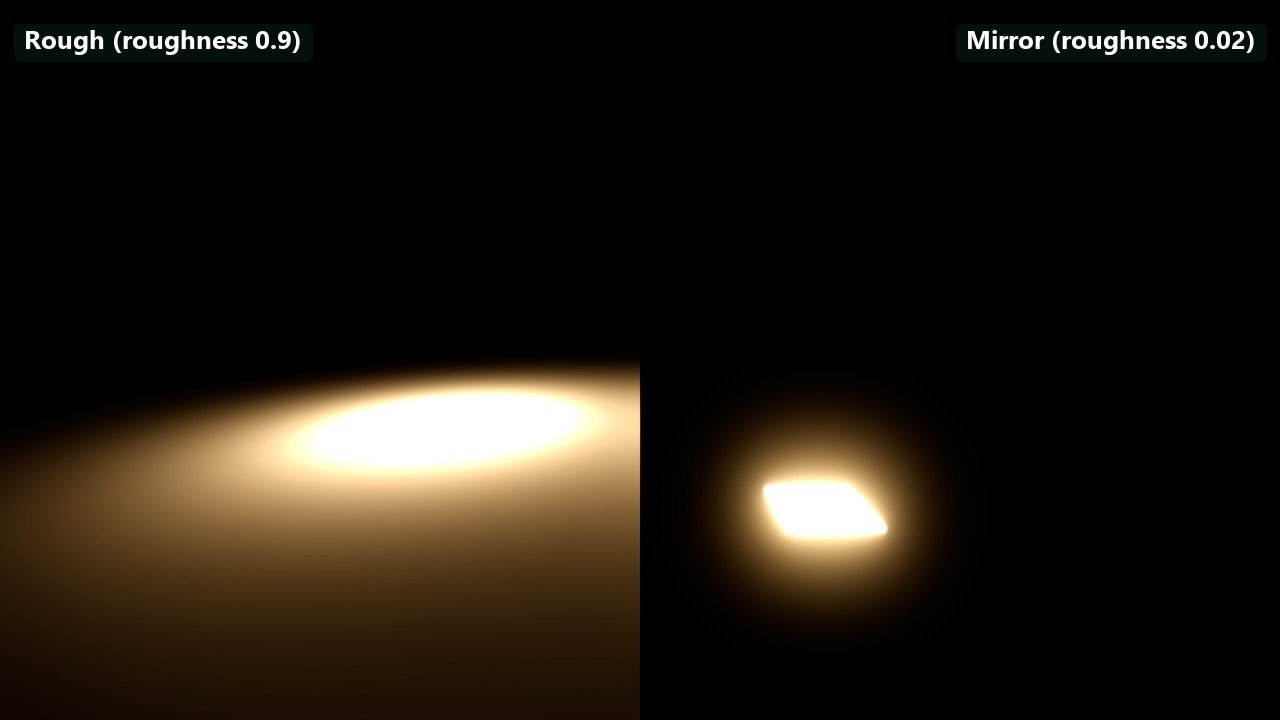
Left: a rough floor (roughness 0.9) shows how the light spreads. Right: a mirror floor (roughness 0.02) shows the light's own shape in its reflection. Two identical lights at default intensity, one over each half, same exposure.
A rect light can project a picture: a cookie texture, or a decal material rendered into a texture, colours the light by where on the rectangle it leaves. A video asset as the cookie turns the light into a screen that lights the room (see Video Playback).
Component properties
The Color, Shading and Shadows groups are shared with the other lights (see Light Properties, Dynamic Shadows and Contact Shadows). The rectangle emits along its object's local −X axis; see Area Lights for orientation, shadows and when to use which area light.
| Property | Default | Description |
|---|---|---|
Temperature | 4000 K | Light colour as a colour temperature, when UseColorTemperature is on. |
IntensityUnit | Lumen | Lumen: total output, kept when the light is resized. Nits: brightness of the emitting surface. |
Intensity | 1000 | Brightness in the selected unit. |
Width, Height | 1 m | Size of the rectangle. |
Range | Auto | Distance at which the light ends. Auto computes it from the brightness. |
Falloff | 1 | Falloff exponent shared with the other local lights. Rect light shading itself dims by the solid angle of the rectangle and only uses Range to end smoothly (see Changes in 0.12). |
TwoSided | Off | Emits from both faces. The emitting area, and the lumens for a given luminance, double. |
Cookie | none | A 2D texture that colours the light across the rectangle. |
Material | none | A decal material rendered into the cookie instead of a texture. Overrides Cookie. |
MaterialResolution | 512 | Resolution of the texture the Material is rendered into, 16 to 1024. Shown only with a material. |
MaterialUpdateInterval | 0 s | Seconds between re-renders of the Material. 0 re-renders it every frame. Shown only with a material. |
Cookies
Since 0.12, rect light cookies are prefiltered when they are loaded: the picture is stored with a blurred border and a chain of blurred versions. Each surface then reads the cookie at the blur that matches how much of the rectangle it sees:
- Mirror-like surfaces close to the light reflect a sharp picture.
- Rough surfaces, and surfaces far from the light, receive the averaged colour of a larger part of the cookie.
- Lookups near the edge of the rectangle fade smoothly into the blurred border instead of smearing the edge pixels.
The same lookup is used for diffuse and specular lighting, for ReSTIR direct lighting and for volumetric fog, so the fog glow in front of a rect light matches the light on the walls.
Changes in 0.12
Several lighting fixes in 0.12 change how existing scenes look:
- Rect light distance. Rect lights no longer apply an inverse-square distance falloff on top of their area integral. They dim naturally as the rectangle covers less of the view from a surface, and
Rangeonly fades them out at the end. Rect lights now carry further than before at the same intensity. - Volumetric fog. Fog is lit by the solid angle of the rectangle instead of an extruded beam.
- Sphere and tube highlights. Specular highlights of sphere- and tube-shaped light sources (such as cylinder lights) keep their energy instead of getting brighter as the source grows.
- Very low specular. A material specular reflectance (F0) below 2 % now acts as a specular mask, also at grazing angles, for direct light, area lights and reflections alike.