Texture Streaming
Streamed 2D textures keep a small mip tail resident and load their larger mips only when a view needs them. All streamed textures together stay inside a texture budget taken from the device's GPU budget (see Memory Budgets). Meshes and the static BLAS cache take their own shares of the same budget, so the three streaming pools and everything else (render targets, shadows, GI) fit on the device together.
Texture streaming is on by default and needs no setup. A texture is never missing, only blurrier until its mips arrive.
How it works
Mip tail. Every mip no larger than Rendering.Textures.Streaming.TailSize texels (64) loads with the texture and stays resident until the texture unloads.
Streamed mips. The mips above the tail load as one GPU texture that holds the chain from the requested top mip down. Only those mips are read from the .plBinTexture2D file. A new set of mips is read and created on the loading thread, then swapped in at the end of the frame within Rendering.Textures.Streaming.SwapBudgetMs. Until then the current mips stay in use.
Demand. For every mesh it draws, a view reports how many screen pixels one UV unit covers. This comes from the view's pixels per metre at the object's nearest point, divided by the mesh's UV density (measured when the mesh buffer is created). A texture of N texels then needs mip log2(N / pixelsPerUV). Main and editor views have importance 1, render-target views 0.5 and reflection views 0.1. Shadow and thumbnail views report nothing.
Textures that no mesh reports. UI, decal, particle and other textures that no mesh reports, but that were used in the last HoldTime seconds, get their full resolution within the budget.
Budget and eviction. Once per frame, textures that need more mips than they have get them, most important first. The budget is the smallest of Rendering.Textures.Streaming.BudgetMB (0 = no cap), BudgetPercent of the application GPU budget, and what other allocations leave free. When a texture does not fit, the least important resident textures give up one mip each, but only for a texture at least 1.5 times as important. A texture that nothing needs any more keeps its mips for HoldTime seconds.
Pressure bias. While the device is over its budget (pressure Critical), every texture that is not in a main or editor view asks for one mip less every 2 seconds, up to three mips. Once the pressure is back to normal, the bias goes back one step every 5 seconds.
Load priority. Mip loads set the texture's resource priority from its importance: High at 0.5 and above, Medium at 0.1, Low below that. The loading queue and the memory budget's headroom both follow the resource priority.
What is not streamed
Cube maps, 3D textures, texture arrays (UDIM), render targets, textures with no mips above the tail, and textures embedded in materials always load whole. Streaming is also bypassed in export mode and while a capture waits for final content.
Configuration
| CVar | Default | Description |
|---|---|---|
Rendering.Textures.Streaming | true | Off: textures load all their mips straight away. |
Rendering.Textures.Streaming.BudgetMB | 0 | Cap for the mips above the tails of all streamed textures. 0 = only the GPU budget share. |
Rendering.Textures.Streaming.BudgetPercent | 45 | Share of the application GPU budget. Mesh detail uses 35% and the BLAS cache 20%. |
Rendering.Textures.Streaming.TailSize | 64 | Largest mip, in texels, that is always resident. |
Rendering.Textures.Streaming.MipBias | 0 | Added to every requested mip. Positive = less memory, blurrier textures. |
Rendering.Textures.Streaming.Prefetch | 0.5 | Mips of detail loaded beyond the current need, so approaching surfaces are sharp when they arrive. |
Rendering.Textures.Streaming.HoldTime | 2 | Seconds that unneeded mips stay resident. |
Rendering.Textures.Streaming.MaxRequestsPerFrame | 16 | Mip loads requested per frame. |
Rendering.Textures.Streaming.SwapBudgetMs | 2 | Time per frame for swapping loaded mips into their textures. |
Memory.GPUAppBudgetMB | 0 | Simulates a smaller GPU. Use it to test pressure on a large card. |
Rendering.Memory.Hud | false | Shows the memory HUD. |
Put quality tuning into project or quality preset overrides, not into the engine defaults. The streaming settings also appear in the editor's Quality Settings panel under Streaming.
Inspect GPU memory and streaming
Memory HUD
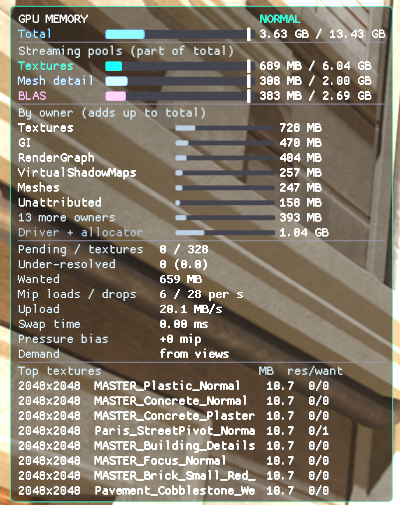
Enable Rendering.Memory.Hud in the console or the CVars panel. A panel appears at the top left of the main (or editor) view:
- Total: everything the process holds on the GPU (the driver's report) against the application budget, with the current pressure. The rows below are parts of the total, not additions.
- The streaming pools against their own budgets: Textures, Mesh detail (only the streamed full meshes) and BLAS.
- By owner (adds up to total): every GPU allocation grouped by its owner (render passes, shadow maps, textures, the geometry pool), refreshed once a second. The six largest are listed and the rest are combined. Driver + allocator is what the total holds beyond all tagged allocations, such as allocator slack, descriptor heaps and driver memory.
- Pending loads, under-resolved textures, wanted bytes, mip loads and drops per second, upload rate, swap time and the pressure bias.
- The largest streamed textures, with their resident and wanted top mip. Red means a texture has fewer mips than the view needs.
In the editor, the status bar's GPU readout shows the engine process's GPU memory against the budget, and its tooltip breaks it down.
Texture Streaming render mode
Switch the viewport to Render Mode › Streaming › Texture Streaming. Objects are coloured by their least resolved streamed texture:
| Colour | Meaning |
|---|---|
| Green | At the mip the view needs. |
| Yellow | One mip short. |
| Red | Two or more mips short. |
| Blue | More mips resident than needed. |
Uncoloured objects only use textures that load whole.
Counters and the streaming ledger
In the Profiler panel's Counters page, the bookmark button pins the memory and streaming counters (Memory/GPU/*, Streaming/Textures/*, Renderer/MeshStreaming/FullMB). Pressure changes and eviction bursts over 64 MB per second appear as Stream markers. Streaming.DumpLedger includes a TextureMips stage with the swap time per frame and the mip loads and drops.
Test under memory pressure
- Open a large scene (Bistro works well) and enable
Rendering.Memory.Hud. - Set
Memory.GPUAppBudgetMBto about half the budget that the HUD's Total row shows. The texture budget shrinks, the least important textures drop mips within a few frames, and the Total bar settles under the budget. - Lower it further until the pressure turns Critical. The pressure bias rises, and the Texture Streaming render mode turns yellow outside the focused view. The focused view stays green as long as its own textures fit.
- Set
Streaming.TextureLoadDelay(seconds per texture read) to exaggerate load latency, then watch for pop-in after camera jumps. - Set
Memory.GPUAppBudgetMBback to 0. Mips return, and the bias falls back within about 15 seconds.
Troubleshooting
| Symptom | Cause and fix |
|---|---|
| A UI or decal texture stays blurry | The same texture is also used on a mesh that stopped reporting. Textures follow mesh reports once they have any. Raise HoldTime, or use a separate texture for the UI. |
| Everything is sharp and memory use is high | The device reports no budget (Null device, or a driver without one) and BudgetMB is 0, so nothing limits the pool. Set Memory.GPUAppBudgetMB or Rendering.Textures.Streaming.BudgetMB. |
| Textures sharpen late after a teleport | The request caps are too low. Raise MaxRequestsPerFrame and Memory.UploadPerFrameMB. Raising Prefetch makes approaching surfaces load earlier. |
| The HUD shows Demand: unknown | No view reported meshes in the last HoldTime seconds. Textures then grow in load order within the budget. |