Networking Overview
This page provides a comprehensive overview of the Plasma Engine networking architecture, core concepts, and how the subsystems fit together.
Architecture
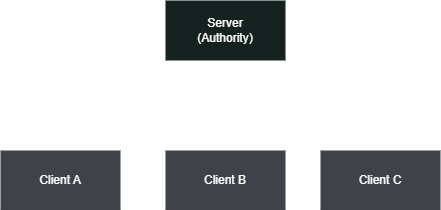
The networking plugin uses a client-server model. One machine acts as the server (or host), and all other machines connect as clients. The server is authoritative over the game state by default, though specific systems support owner-authoritative models for responsive player control.
Roles
There are three connection roles, controlled by how you start the plNetworkWorldModule:
Server-- A dedicated server with no local player. Starts with
StartServer().Client-- Connects to a remote server. Starts with
StartClient().Host-- Acts as both server and client simultaneously (listen server). Starts with
StartHost().
Connection Flow
The server calls
StartServer()which binds to the configured port.Clients call
StartClient()which initiates a connection to the server address.A handshake exchange validates the protocol version and game version.
On success, the server assigns the client a unique Client ID and begins replicating existing world state.
The client receives spawn messages for all existing networked objects and their component states.
Subsystem Overview
The plNetworkWorldModule is the central hub. It owns and provides access to all networking subsystems:
Subsystem | Class | Purpose |
|---|---|---|
| Connection management, tick loop, message routing | |
| Spawn/despawn prefabs, ownership, pooling | |
| Remote procedure calls with reflection | |
| Property replication with conditions | |
| Smooth remote transform rendering | |
| Lobby, ready state, game flow | |
| Synchronized level loading | |
| Clock synchronization | |
| Delta compression, priority scheduling | |
| Server-side rewind for hit validation |
Authority Models
The plugin supports two primary authority models. You choose per-object based on your game's requirements.
Server Authoritative
The server has full control over an object's state. Clients send inputs or requests to the server (typically via RPCs), and the server updates the authoritative state, which is then replicated to all clients.
Best for: Combat, inventory, game rules, AI, anything where cheating prevention matters.
Owner Authoritative
The owning client drives the object's state locally and replicates it to the server and other clients. The server may validate but does not override.
Best for: Player movement, camera, responsive local actions. The plNetworkedTransformComponent uses this model by default.
Object Roles
Each networked object has a plNetworkObjectRole that describes its authority level:
OwnedAuthoritative-- The owning client has full authority.Replicated-- The server has authority; clients receive read-only replicas.ReplicatedSimulated-- Like Replicated, but clients run local simulation (prediction) while still accepting server corrections.
Message ID Ranges
Network messages are categorized into three ranges:
Range | Purpose | Example |
|---|---|---|
0 - 63 | Core protocol | Handshake, spawn/despawn, RPC, time sync, level management |
64 - 127 | Engine components | Transform state replication |
128 - 255 | User/game messages | Custom game-specific messages |
Game code should use message IDs starting at plNetworkMessageIDs::UserMessageStart (128) and register a callback via SetUserMessageCallback() on the world module.
Replication Loop
Each network tick (default 60 Hz), the server performs the following:
Process incoming messages-- Handshakes, RPCs, client state updates, level acks.
Update subsystems-- Time sync, level manager, lag compensation.
Replicate dirty components-- For each component marked dirty (
MarkDirty()), serialize its state and send to all relevant clients. Components with per-recipient properties (e.g.,OwnerOnly) are serialized separately per client.Broadcast transform states-- Transform components send their state at their configured send rate.
Late-Joiner Synchronization
When a new client connects, the server automatically:
Sends spawn messages for all existing networked objects.
Sends the full component state of each object (
SyncComponentStatesToClient).If a level is loaded, sends the level load message and waits for the client's ack before sending
LevelStart.
Transport Layer
The plugin uses ENet as its transport layer, providing:
Reliable ordered-- Guaranteed delivery in order (RPCs, spawn/despawn).
Reliable unordered-- Guaranteed delivery, may arrive out of order.
Unreliable ordered-- May be lost, but always in order.
Unreliable-- Fire-and-forget (frequent state updates where only the latest matters).
The transport is abstracted behind plNetworkPeer, so alternative drivers could be added in the future.
Configuration
Network settings are configured through plNetworkConfig:
Set the config before starting the network: